Tutorial 5: Run a demo MobileNetV3
In this tutorial, we will show you how to run a demo MobileNetV3 on Zhouyi NPU.
1. Download model
You can download the model from this link: https://storage.googleapis.com/mobilenet_v3/checkpoints/v3-small_224_1.0_uint8.tgz This is a quantized TFLite model.
2. Config
# mobilenetv3.cfg file
[Common]
mode = build

[Parser]
model_type = tflite
model_name = mobilenet_v3_quant
model_domain = image_classification
input_model = v3-small_224_1.0_uint8.tflite

[Optimizer]
scaling_bits = {softmax:[20, -1]}
output_dir = out_ir

[GBuilder]
target = X2_1204
outputs = mobilenetv3.aipuelf
3. Build
aipubuild mobilenetv3.cfg
This will build from the tflite model into aipu executable file.

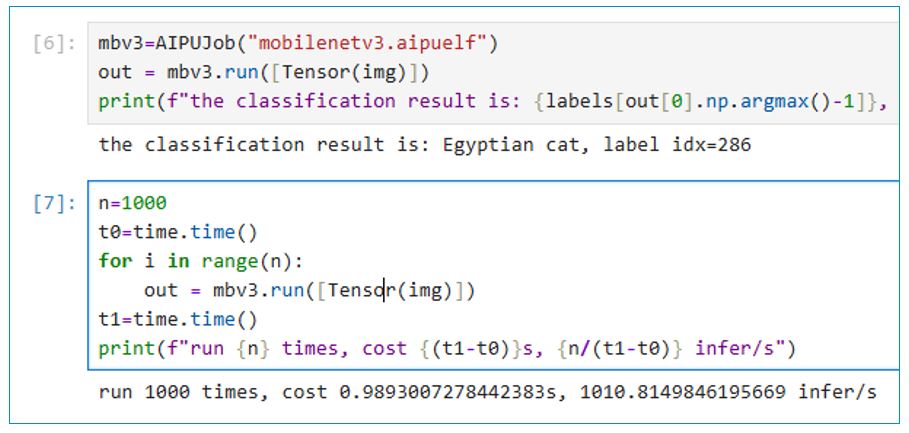
4. Run AIPUModel
Now we can load the mobilenetv3.aipuelf and run with a test image.

You can test the performance by repeatly running n times and get the average time.
5. Other Tips
Using quantized models with ONNX and TFLite, you don’t need to prepare quantization data.
Small models work well with single-core X2_1204. For large models, use multi-core X2_1204MP3 as the target.
Multi-core models require enabling tiling=fps to achieve performance improvement from multiple cores.
Save the intermediate generated IR for easier debugging and performance tuning later. Example: output_dir = path/to/save
Install Graphviz to visualize the model structure during the Gbuilder phase. Example formats: svg=graph.svg or png=graph.png
Use Netron to view the original model and intermediate IR.